How to View Your Medical Imaging Records Directly Online
 Received a CT scan or MRI in DICOM format but can’t view it? Learn how to open, analyse and share your medical imaging records directly from your browser — no software to install.
The Invisible Problem: Medical Records You Cannot See
You come home after an MRI. The radiologist hands you a CD (or, at best, a download link) and says: “Bring these to the specialist for your appointment next week.” You get home, insert the CD into your computer and… nothing. Your laptop doesn’t have an optical drive. You download the files, but they are in a format called DICOM that no program on your computer can open. You search online for a free viewer: you find dozens, but they all require installation, are often outdated, and have complex interfaces designed for radiology technicians — not patients.
Meanwhile, the specialist asks you to send the images before the appointment for a preliminary review. And you can’t even look at them yourself.
This is the everyday reality for anyone who receives diagnostic imaging exams: your medical records exist, they are yours by right, yet the technology needed to view them remains out of reach. A paradox that Ippocra has set out to solve.
Marco’s Story: When Your Medical Records Become Unreadable
“I had a shoulder MRI after a sports injury. They gave me a CD with the images and a PDF report. I read the PDF straight away, but I wanted to see the actual MRI images because the specialist I need to consult is in Milan and the appointment is a week away. I tried opening the CD: my MacBook doesn’t have a disc drive. I asked a friend to copy the files onto a USB stick, but once on my computer they were in a strange format — DICOM — that no program could read. I searched for an online viewer, but the free ones asked me to install software I didn’t understand and didn’t trust. In the end, I photographed the paper report with my phone and sent it to the doctor on WhatsApp. But the MRI images? Those stayed trapped in the CD.”
— Marco, 42, engineer
Marco’s experience is not an exception — it is the norm. DICOM (Digital Imaging and Communications in Medicine) is the international standard for diagnostic imaging, used by every hospital and radiology centre in the world. But it is a standard designed for machines and professionals, not for patients.
The Root of the Problem: Why You Cannot View Your Own Medical Imaging Records
The difficulty in viewing your own diagnostic imaging exams stems from the convergence of three structural factors:
DICOM is not a consumer format: Unlike a PDF or a JPEG image, a DICOM file contains not just the image but also hundreds of clinical metadata fields (patient data, exam parameters, machine information). Standard image viewers cannot interpret this complex structure. Dedicated software is required — often expensive or designed for healthcare professionals.
The obsolescence of physical media: Many healthcare facilities continue to deliver medical imaging records on CDs or DVDs, even though most modern computers no longer have optical drives. It is a technological anachronism that directly penalises the patient.
The absence of digital continuity: Even when the files are accessible, they remain isolated. They are not linked to your clinical history, they are not searchable, and they cannot be shared securely with other specialists. Each exam is a digital island.
View and manage your medical imaging records
Try Ippocra
Integrated DICOM Viewer: Your Medical Imaging Records Always Accessible
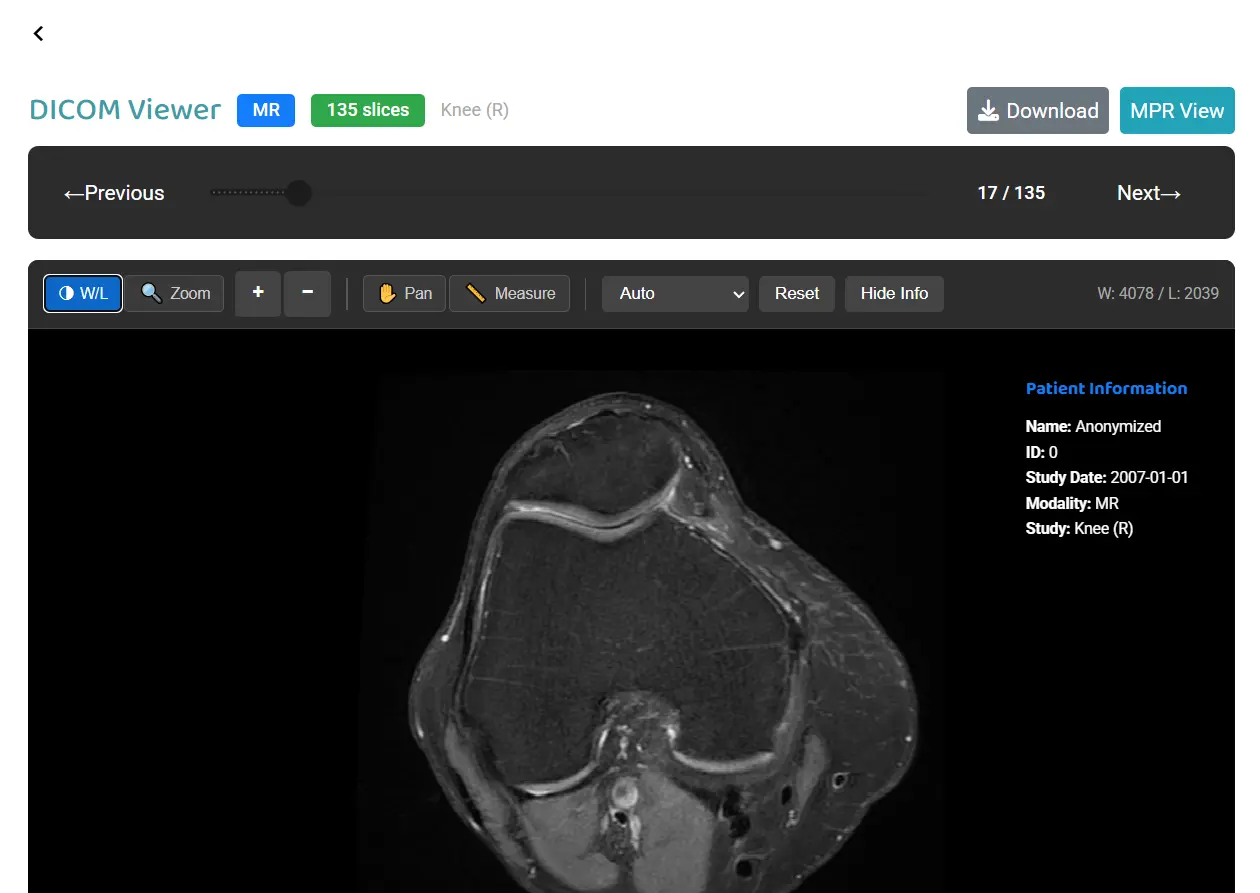
Ippocra has integrated a professional-grade DICOM viewer into its platform, allowing anyone to open, analyse and navigate their diagnostic imaging exams directly from the browser — no software installation required.
1. Professional Viewing Without Any Software to Install
By uploading your DICOM files to Ippocra, you can instantly view CT scans, MRIs, X-rays and any other diagnostic imaging exam. The integrated viewer offers professional-level tools:
- Slice navigation: scroll through the different sections of the exam, exactly as a radiologist does on their workstation.
- Contrast and brightness adjustment (windowing): modify the display parameters to highlight different tissues (bone, muscles, internal organs). The same exam can reveal entirely different details with different settings.
- Measurements and annotations: measure distances and areas directly on the images — an essential feature for monitoring the size of lesions or abnormalities over time.
- Multi-planar reconstruction: view the exam from different perspectives (axial, coronal, sagittal) for a complete three-dimensional understanding of the anatomy.
Ippocra’s DICOM viewer with adjustment and navigation tools
2. Integration with Your Digital Clinical History
The value of Ippocra’s DICOM viewer goes beyond viewing: every imaging exam becomes an integral part of your digital medical record.
- Chronological archiving: Your medical imaging records are automatically placed within the timeline of your clinical history, alongside lab results, specialist visits and prescriptions. This allows the doctor to correlate imaging findings with the overall clinical picture.
- Instant search: Need to find the MRI you had six months ago? A quick search returns exactly what you need, without sifting through folders and CDs accumulated over time.
- Access from any device: During an appointment, your specialist has immediate access to your diagnostic images, even if the exam was performed at a different facility. Everything is available on smartphone, tablet and computer, wherever you are.
3. Secure Sharing with Complete Control
When you need to submit your diagnostic images for a second opinion or share them with a new specialist, Ippocra eliminates the need to transfer large files through insecure channels:
- Secure link (IppoLink): Generate a protected link that allows the doctor to view your medical imaging records directly from their browser — no downloads and no DICOM software needed.
- Time-limited access: Set an automatic expiry for the link, ensuring your data is accessible only for the time needed for the consultation.
- Encryption and privacy: Every share is protected by advanced encryption and compliant with healthcare data protection regulations. The doctor receives access only to the medical records you have selected — nothing else.
Ownership of Your Medical Imaging Records: A Right, Not a Privilege
Medical imaging records are among the most important healthcare documents and, paradoxically, among the least accessible for the patient. A CT scan can reveal decisive information for a diagnosis, but if the patient cannot even view it, that information remains trapped in a technical format and on an obsolete medium.
With Ippocra’s DICOM viewer, professional technology becomes accessible to those who truly need it: the patient. Viewing, archiving and sharing your imaging exams no longer requires technical expertise or specialised software. It only requires a tool designed to give people back control over their clinical history.
After discovering Ippocra, Marco uploaded all his imaging exams from the last five years. Now, before every specialist appointment, he opens his medical records from his phone, reviews them at his own pace and shares them with the doctor in seconds. No CDs, no software, no intermediaries.
Your medical imaging records belong to you. Being able to view them when you need to is the first step towards taking control of your health.
View your imaging exams with Ippocra
Free registration
Frequently Asked Questions
What diagnostic imaging formats does Ippocra’s viewer support?
The integrated viewer supports DICOM, the international standard used by all diagnostic imaging equipment (CT scanners, MRI machines, X-ray units, digital ultrasound, PET scanners, mammography). If you received a CD or downloadable file from a healthcare facility, it is almost certainly in DICOM format and can be uploaded directly to Ippocra. The platform also handles medical records in PDF format and standard images (JPEG, PNG) for non-DICOM documents.
Does the doctor need DICOM software to view the images I share?
No. When you share your medical imaging records via IppoLink, the receiving doctor can view the images directly from their browser, on any device (computer, tablet, smartphone). There is no need to install any DICOM software, download files or have an Ippocra account. The secure link provides immediate access to the integrated viewer with all professional analysis tools.
DICOM files are very large — is there a storage limit?
Ippocra is designed to handle large medical records, including imaging exams that can weigh hundreds of megabytes. Each plan offers storage space tailored to individual or family needs; for details, see our dedicated page. Ippocra’s cloud infrastructure is optimised to ensure fast upload times and smooth viewing even for the most voluminous exams.